The DJI Mimo alternative for your computer
DJI Mimo lives on your phone. If you record with the mic plugged into your computer, it makes sense to control it from there. That's what Mic Control does.
For DJI Mic 3, Mic Mini and Mic Mini 2. Independent project, not affiliated with DJI.
Is there a DJI Mimo for PC or Mac?
Not for the DJI Mic. DJI Mimo is a phone app for iOS and Android, and the DJI Mic 3’s downloads page offers Mimo for phones, manuals and compatibility lists, but no desktop software. On Macs with Apple Silicon, the App Store does offer the iPad version of DJI Mimo, marked as designed for iPad and not verified for macOS. Searches for “DJI Mimo for PC” mostly lead to Android emulators.
That’s a problem when the mic lives on your desk. If you record podcasts, streams, classes or calls with the receiver plugged into the computer, changing a setting means picking up the phone, or the receiver’s touchscreen, for a device that’s already connected to the machine in front of you.
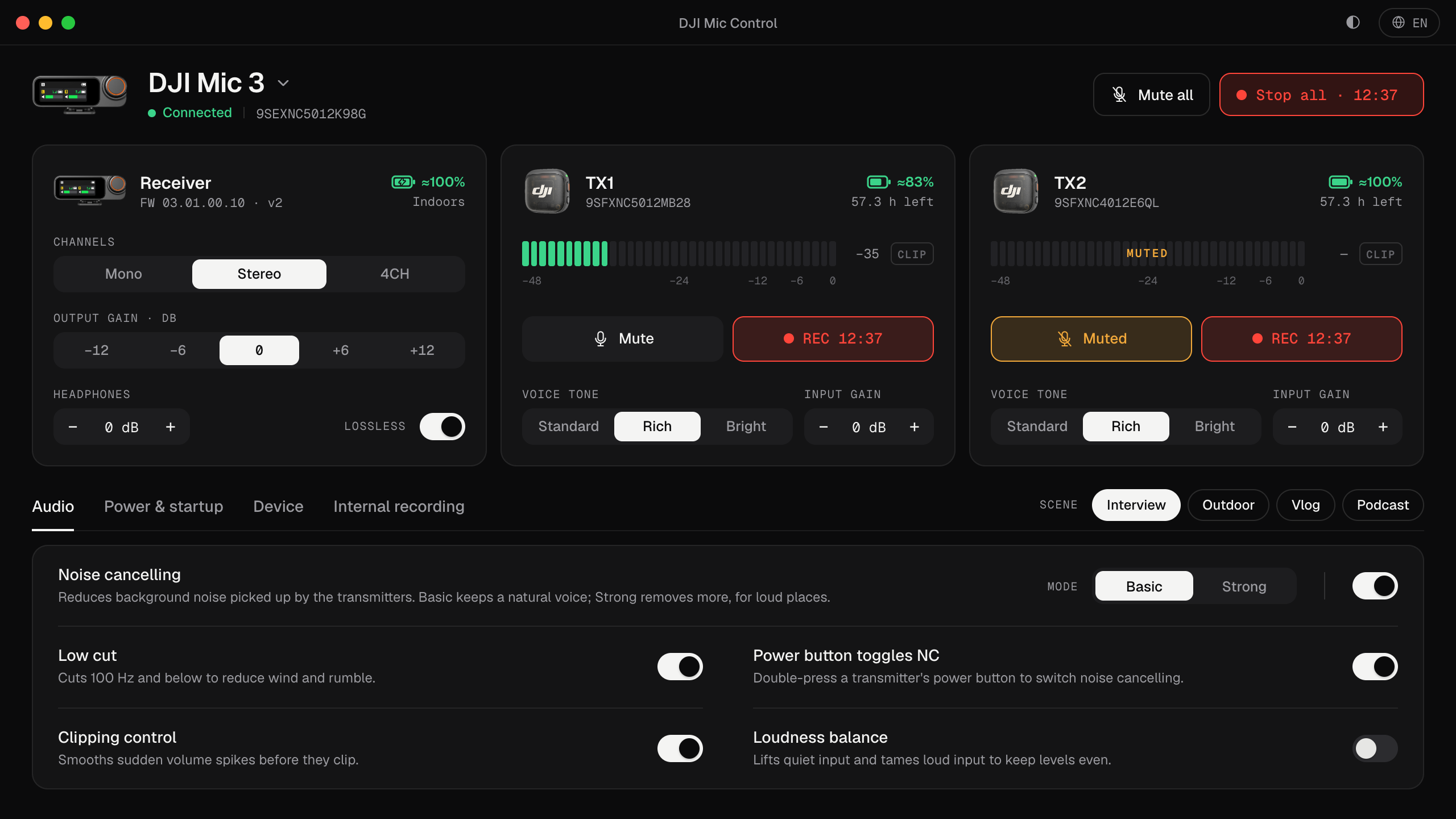
Mic Control is an independent, open-source desktop app that does that part from the computer: you plug the receiver in over USB-C and its settings are on your screen. It’s for DJI Mic receivers: the Mic 3, tested, and the Mic Mini family, with fewer settings. It doesn’t work with DJI cameras such as the Osmo series.
What Mic Control does, and what stays in DJI Mimo
| Task | In Mic Control |
|---|---|
| Live levels for each transmitter, with a clip warning | Yes |
| Gain, noise cancelling, low cut, voice tone, lossless audio | Yes |
| Channel mode: mono, stereo or 4CH | Yes |
| Internal recording: start and stop, 32-bit float, loop recording | Yes |
| Mute or record every transmitter at once | Yes |
| Scenes that change several settings in one click | Yes |
| Battery and recording time left on each transmitter | Yes |
| Firmware updates | No: use DJI Mimo |
| Formatting the transmitters’ storage | No: use DJI Mimo or the receiver |
| Timecode | No: use DJI Mimo or the receiver |
Mic Control only changes settings that the receiver or DJI Mimo already let you change, and it never touches the firmware. You can use both: what you change in one shows up in the other, because the settings live on the mic itself.
Why do it from the computer
- You see the levels. The receiver’s screen is the size of a stamp; on the computer, each transmitter has a full-size meter, and a clip warning that stays lit long enough to notice.
- You don’t touch the mic during a take. Change the gain or mute a guest from the computer, while you keep recording in your own software.
- Everything is in one place. Every setting has a one-line explanation, sorted in tabs, without menus inside menus.
- It doesn’t get in the way of the audio. The sound and the settings travel over separate USB interfaces, so your recording app keeps the microphone while Mic Control changes settings.
Platforms
- Mac (Apple Silicon): signed and notarized by Apple, tested with a DJI Mic 3. See the Mac guide.
- Windows and Linux: previews, built from the same code but not yet tested with a receiver. See the Windows and Linux guides.
It’s free, needs no account and has no network code: no telemetry and no auto-updater. The code is public on GitHub.
When you still need the phone
- Firmware updates. DJI updates the firmware through DJI Mimo on a phone.
- Formatting the transmitters’ storage, and timecode.
For everything else, start with every DJI Mic 3 setting explained and how to connect the mic to your computer.
From your phone to your computer
- 01
Download Mic Control
There are installers for Mac, Windows and Linux. On Windows and Linux it's a preview.
- 02
Plug the receiver in over USB-C
The same cable you already record with.
- 03
Adjust on screen
Levels, gain, noise, scenes and recording. Without reaching for your phone.
What you'll be able to do
- See each transmitter's levels live, with a clip warning.
- Change input gain, output gain and headphone volume.
- Turn on noise cancelling, low cut and clipping control.
- Mute or record on every transmitter in one click.
- Apply scenes: Interview, Outdoor, Vlog and Podcast.
- See battery and recording time left.
FAQ
Does it do everything DJI Mimo does?
Almost every audio and recording setting. It doesn't do timecode, formatting the transmitters' storage or firmware updates: for those, use the official app.
Can I install DJI Mimo on a Mac?
On Macs with Apple Silicon, the App Store offers the iPad version of DJI Mimo, marked as designed for iPad and not verified for macOS. Mic Control is built for the desktop instead, for DJI Mic receivers plugged in over USB.
Can I use both?
Yes. Mic Control doesn't change anything on the mic that you couldn't also change on the receiver or in DJI Mimo.
Why on the computer?
Because if you record podcasts, streams or classes, the mic is already plugged in there. Seeing levels big avoids nasty surprises.