DJI Mic 3 Lossless audio: should you turn it on?
Lossless sends uncompressed audio from the transmitters to the receiver. It costs half the range and some battery. At a desk that's a bargain; on the move it may not be.
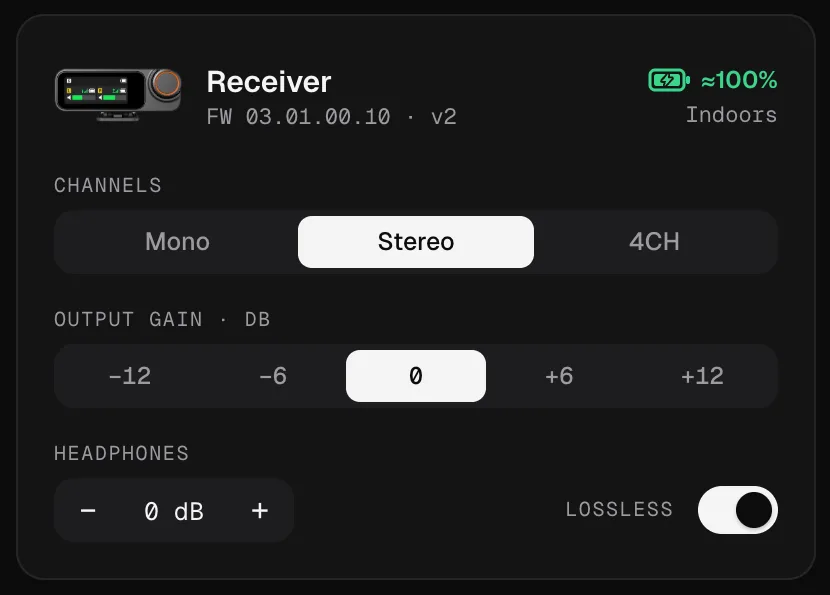
What Lossless does
The transmitters send their audio to the receiver wirelessly. Normally that link is compressed, to save range and battery. With Lossless on, the transmitters send uncompressed 48 kHz / 24-bit audio instead, so what reaches the receiver is exactly what the microphone captured.
It’s a receiver setting, and it affects the wireless link: what the receiver then sends to your computer, camera or phone, and the transmitters’ own internal recordings, are separate.
What it costs
According to DJI, Lossless has two prices:
| Lossless off | Lossless on | |
|---|---|---|
| Range (two transmitters) | Up to 400 m | Up to 200 m, about half |
| Transmitter battery | Normal | About 2 hours less |
Both figures come from DJI’s own specifications and store page, measured in ideal conditions. In a real room, with walls and people in between, range is always shorter; halving it still matters if you’re far from the receiver.
Should you turn it on?
Turn it on when:
- You record at a desk or a table: a podcast, a stream, a class, a video call. The transmitters are a couple of metres from the receiver, so range is irrelevant.
- The recording matters and you’ll edit it: uncompressed audio gives the editor the cleanest material.
- The transmitters can be charged between sessions.
Leave it off when:
- You need distance: vlogging while walking, a presenter moving around a venue, a camera far from the subject.
- You record long days away from a charger and need every hour of battery.
Will you hear the difference?
In a quiet room with a good voice, often only slightly. Compression is designed to be hard to notice, and the receiver’s output still passes through your computer’s or camera’s chain afterwards. Lossless is about removing one step that loses information, not about a dramatic change in sound. For important recordings at a desk it costs you nothing that matters, which is why Mic Control’s Podcast scene turns it on.
How to turn it on
- In DJI Mimo on your phone, or on the receiver.
- From the computer, in Mic Control: the Lossless switch on the receiver card. It’s also part of the Podcast scene, together with stereo and 32-bit float.
Lossless, 32-bit float and the USB audio
These three get mixed up, so here’s how they fit together:
- Lossless is the wireless link from each transmitter to the receiver: 48 kHz / 24-bit, uncompressed.
- 32-bit float is the internal recording inside each transmitter: a backup with far more headroom, so a shout doesn’t clip. See 32-bit float.
- The USB audio is what the receiver sends to your computer, as a USB microphone. Neither setting turns it into 32-bit.
You can use them together: Lossless for the live signal, 32-bit float for the backup. The rest of the settings are explained in every DJI Mic 3 setting.
Turn it on from your computer
- 01
Plug in the receiver
And open Mic Control.
- 02
Switch on Lossless
On the receiver card. Or apply the Podcast scene, which turns it on with stereo and 32-bit float.
- 03
Keep the transmitters close
With Lossless on, the range is about half, so keep the receiver within a few metres.
What you'll be able to do
- Turn Lossless on or off from the receiver card.
- See each transmitter's battery, which Lossless drains faster.
- Apply the Podcast scene: stereo, Lossless and 32-bit float in one click.
FAQ
Does Lossless make the USB audio better?
It removes compression on the wireless link from the transmitters to the receiver. The USB audio to the computer is a separate step; Lossless doesn't make it 32-bit.
How much range do I lose?
According to DJI, about half: up to 400 m without Lossless and up to 200 m with it, with two transmitters, in ideal conditions.
How much battery?
According to DJI, about 2 hours less on each transmitter.
Is it the same as 32-bit float?
No. Lossless is the live wireless link; 32-bit float is the internal recording inside each transmitter. You can use both.