Desktop app for DJI Mic 3, Mic Mini and Mic Mini 2

Stop setting up your mic with your fingertip.

Mic Control puts your DJI Mic's settings on your computer screen. Levels, noise, recording, battery. All in view. All one click away.

Download for macOS
Free. No sign-up. Also for Windows and Linux
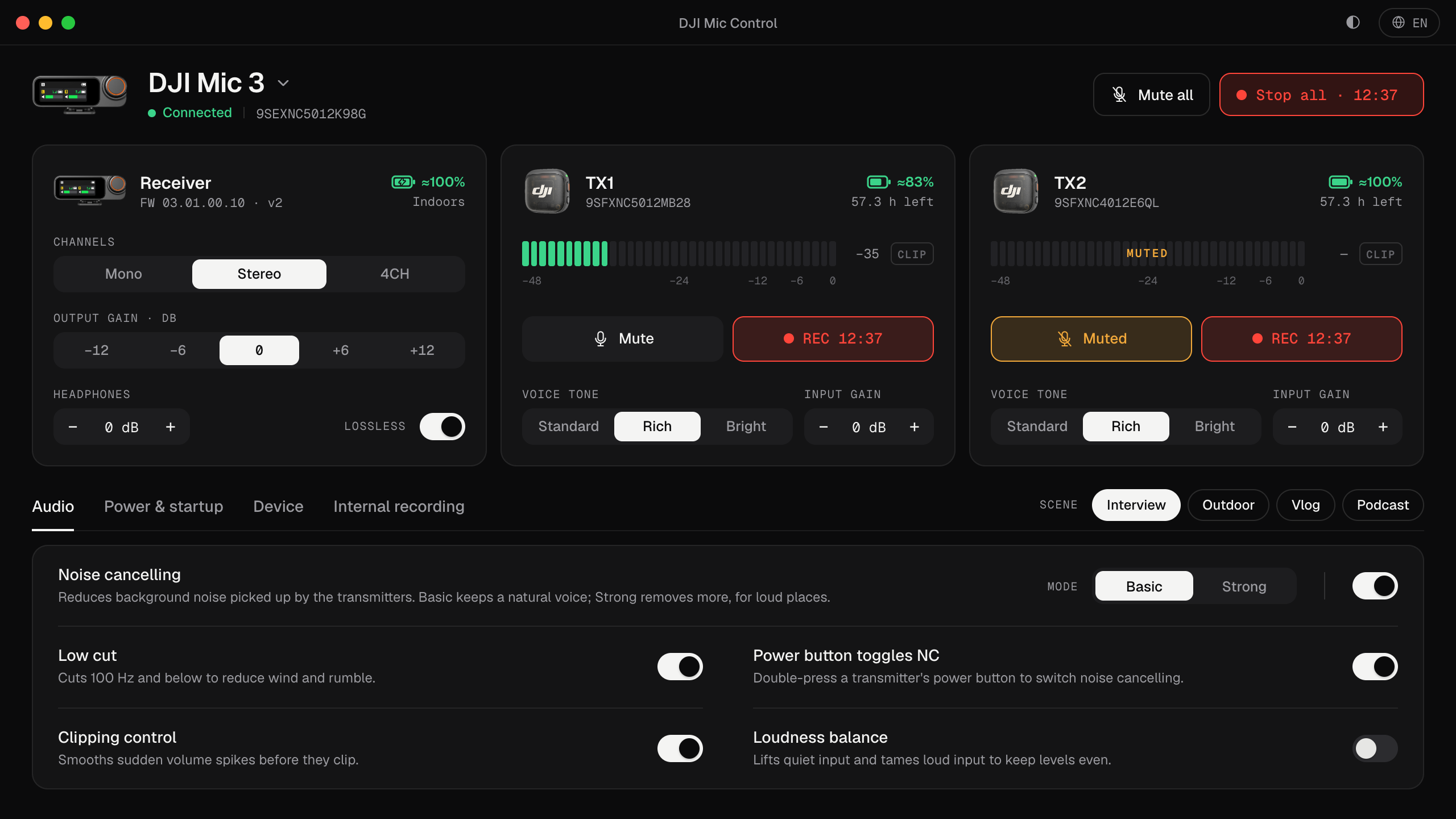
Mic Control, the desktop app for DJI Mic 3: receiver and two transmitters with live levels, recording and scenes
Let me tell you something

You record an hour-long interview.

Good light. Good guest. Good conversation.

You get home, open the audio, and it's clipped. Start to finish.

The gain was too high. You'd have caught it in a second… if you'd had somewhere to look.

But all you had was a screen the size of a stamp, a thumb, and a deadline.

Mic Control exists so that never happens again. Plug the receiver in over USB and see everything: live levels for each transmitter, battery, recording time left. And if something's about to clip, it turns red before it's too late.

It's not magic. It's a big screen. The one already in front of you.
What it does

Everything your mic could already do. Now where you can see it.

01

See the problem before it exists.

Live meters for every transmitter, with peak hold and a clip warning. Push the gain too far and you know right then. Not in the edit.

02

Four scenes. One click.

Interview, Outdoor, Vlog and Podcast. Each scene changes several settings at once: noise reduction, low cut, channels and voice tone. Show up, pick, record.

03

Mute or record everything with one button.

Mute every guest at once. Start internal recording on every transmitter together. With a timer, so you know how long you've been rolling.

04

And everything else, without hunting for it.

Every setting sorted into tabs and explained in one line. No info icons. No manual.

Input gainOutput gainHeadphone levelLossless audioVoice toneNoise cancellingLow cutClipping controlLoudness balanceMono, stereo and 4CH32-bit float recordingLoop recordingAuto power-offLEDs and vibrationMultiple receiversLight and dark theme

It's not for everyone.

It's for you if…
  • You record with the mic plugged into your computer: podcasts, streams, classes, videos.
  • You use two transmitters and want to see both at once.
  • You've lost a take to a bad level. Once is enough.
It's not for you if…
  • You only record on your phone and never touch a setting.
  • You don't own a DJI Mic. Yet.
  • You'd rather guess.
Compatibility

Works with what you already have.

Plug the receiver in over USB. Open Mic Control. Done. If your model doesn't have a setting, it simply doesn't show up. Tested with the Mic 3; the Mic Mini and Mic Mini 2 aren't tested in this version yet.

DJI Mic 3 transmitter
DJI Mic 3USB
DJI Mic Mini transmitter
DJI Mic MiniUSB
DJI Mic Mini 2 transmitter
DJI Mic Mini 2USB
Guides

Guides to use your DJI Mic on your computer

See all guides →

The questions you're asking yourself

How much is it?

Nothing. Download it and use it.

Is there a DJI Mic 3 app for Mac or PC?

Yes. Mic Control is a desktop app that controls the DJI Mic 3, Mic Mini and Mic Mini 2 from your computer. Plug the receiver in over USB-C and its settings are on screen.

Do I need my phone or the DJI Mimo app?

No. Everything happens on your computer, with the receiver plugged in over USB.

How do I connect the DJI Mic 3 to my computer?

With a USB-C cable to the receiver. Open Mic Control and it finds it. On Windows you switch a driver with Zadig once; on Linux, only with the AppImage, you grant USB access once. Step by step, with Zoom and OBS: how to connect it.

Is this an official DJI app?

No. Mic Control is an independent project. It isn't affiliated with or endorsed by DJI.

Do I need an account?

No. Open it, plug in the mic, and go.

Can it break my mic?

It doesn't touch the firmware. It only changes settings the receiver or DJI Mimo already let you change.

Which models work?

DJI Mic 3, tested on hardware. DJI Mic Mini and DJI Mic Mini 2, with fewer settings and not yet tested in this version. What your model doesn't have doesn't show up.

What languages is it in?

English, Spanish, French, German, Italian and Dutch. Just like this page.

Your next take, right the first time.

Download for macOS Free. No sign-up.

P.S. Next time something turns red, make it on your screen. Not in the edit.

Your download has started.

Mic Control is free and will stay free. If it saves you a scare (or a take), buy me a coffee. You choose how much.

Buy me a coffee
Didn't start? Download it here