DJI Mic 3: mono, stereo or 4CH (and why you only hear one mic)
If a voice is missing, or comes out of one ear only, it's almost always the channel mode. Here's what each mode does and which one to pick.
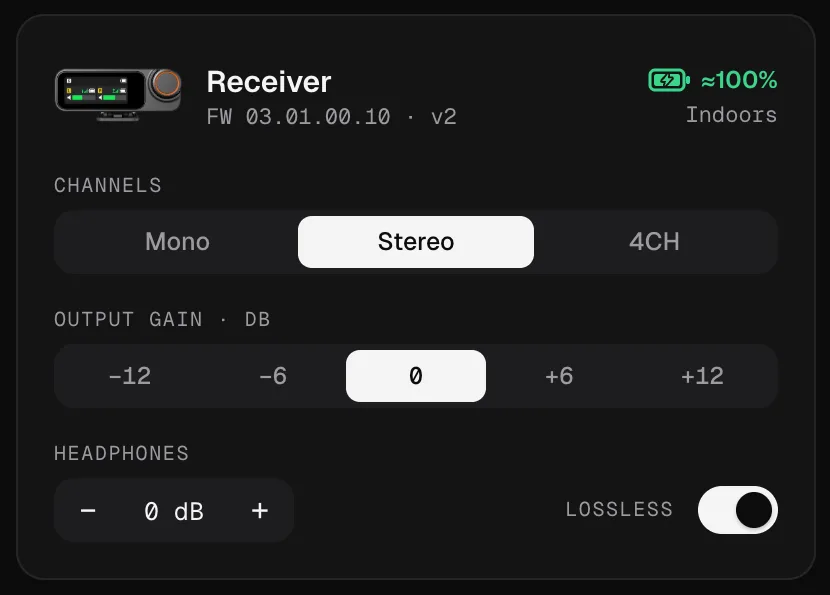
The three modes at a glance
| Mode | What the computer receives | Use it for |
|---|---|---|
| Mono | Every transmitter mixed into both channels | Calls, streams, one-person videos: whenever one track is enough |
| Stereo | TX1 on the left channel, TX2 on the right | Interviews and podcasts with two people you want on separate tracks |
| 4CH | Each transmitter (up to four) on its own channel | Three or four people, if your software can record a four-channel input |
The mode is a receiver setting: it decides what goes out over USB and through the 3.5 mm output (in 4CH, the 3.5 mm output stays stereo; see below). You change it on the receiver’s screen, in DJI Mimo or, from the computer, in Mic Control.
“I only hear one mic”
The classic case: two transmitters, the receiver in Stereo, and a call in Zoom, Teams, Meet or Discord. Call apps usually take a single channel of the input, so you hear TX1 (left) and TX2 disappears.
Fix: switch the receiver to Mono. Both voices are mixed into both channels and any app picks them up.
“My voice only comes out of one ear”
One transmitter with the receiver in Stereo: the signal only exists on one side, the left one if it’s TX1. Listeners hear you in one ear only.
Fix: switch to Mono. If you’d rather keep Stereo for the recording, tell the app to use the input as mono. In OBS, for example, open Edit → Advanced Audio Properties and tick Mono for that source.
Stereo: two voices, two tracks
Stereo is the mode for recording two people and editing each voice separately. The trick is in the edit: the file is one stereo clip, and you split it into two mono tracks.
- Premiere Pro: Clip → Modify → Audio Channels, and set the clip as two mono channels.
- DaVinci Resolve: right-click the clip → Clip Attributes → Audio, and set the format to mono for each channel.
- Audacity: in the track’s menu, Split Stereo to Mono.
Write down who wore TX1 and who wore TX2. It saves you a guess later.
4CH: up to four separate tracks
On the Mic 3, 4CH gives each transmitter its own channel. Before you use it, keep in mind:
- The receiver changes its USB identity. When you switch to or from 4CH, the computer sees the audio device disconnect and reconnect. Pick the input again in your app if it gets lost. Mic Control recognizes the receiver in both modes.
- Your software has to accept four channels. Most call apps don’t. DJI publishes a compatibility list of computer software for this mode on the Mic 3’s downloads page.
- The 3.5 mm output stays stereo. According to DJI, TX1 and TX3 go to the left channel and TX2 and TX4 to the right.
- The Mic Mini has no 4CH: only Mono and Stereo.
Mic Control supports up to four transmitters on the Mic 3; it has been tested with two.
Which mode should you use?
- Video call or live stream with one person: Mono.
- Video call with two people sharing a computer: Mono.
- Two-person podcast or interview: Stereo, and split the tracks in the edit.
- Vlog or one-person video: Mono.
- Three or four people: 4CH if your software supports it. If not, Mono, plus each transmitter’s internal recording as a backup.
Mic Control’s scenes already include the right mode: Interview and Podcast set Stereo; Outdoor and Vlog set Mono.
What about Safety Track?
On the Mic Mini, Safety Track records a backup copy 6 dB quieter on the second channel, so you still have a clean take if the main one clips. Because it uses that second channel, it only works with the receiver in Mono. The Mic 3 has no Safety Track mode: its safety net is the transmitters’ 32-bit float internal recording.
Change the channel mode from your computer
- 01
Open Mic Control
With the receiver plugged in over USB-C.
- 02
Pick Channels on the receiver card
Mono, Stereo or 4CH. Switching to or from 4CH reconnects the receiver's USB audio for a moment.
- 03
Check it in your app
Talk into each transmitter and watch the meters. In 4CH, make sure your app sees four channels.
What you'll be able to do
- Switch between mono, stereo and 4CH in one click.
- See each transmitter's level, so you know who's on which channel.
- Apply the Interview or Podcast scene (stereo) or Vlog (mono).
FAQ
Why do I only hear one mic in Zoom or Teams?
Because the receiver is in Stereo and the app only uses one channel. Switch to Mono and both voices go to both channels.
Why does my voice only come out of the left ear?
Same cause: in Stereo, TX1 is the left channel. With a single transmitter, use Mono, or tell your app to treat the input as mono.
Can I get each person on their own track?
Yes. In Stereo, TX1 is left and TX2 is right; in the edit, split the stereo clip into two mono tracks. With three or four transmitters, use 4CH if your software supports it.
Does the Mic 3 have Safety Track?
No. The Mic Mini has it (a copy 6 dB quieter on the second channel). On the Mic 3, the safety net is 32-bit float internal recording.
What happens to the 3.5 mm output in 4CH?
It stays stereo. According to DJI, TX1 and TX3 go to the left channel and TX2 and TX4 to the right.