DJI Mic software for PC and Mac: every option, compared
DJI doesn't make desktop software for its wireless mics. That doesn't leave you without options. Here's what each one does, and what it can't.
The short answer
DJI doesn’t make desktop software for its wireless mics. DJI Mimo, the app that controls them, is for iOS and Android phones, and the DJI Mic 3’s downloads page offers no Windows or Mac program. DJI does have a desktop app, DJI Studio, but it’s listed for other products such as the Osmo 360, not for the Mic.
You don’t need any software to record with the mic on a computer: over USB-C the receiver is an ordinary USB microphone, “Wireless Microphone RX”. Software only matters if you want to change its settings or see its levels from the computer. See how to connect it for the recording part.
For the settings, these are the options:
| Option | Runs on | Mics | Good for |
|---|---|---|---|
| DJI Mimo | iPhone, Android | All current DJI Mics | Official app, firmware updates |
| DJI Mimo (iPad version) | Apple Silicon Macs, via the App Store | — | Not verified for macOS by Apple; not tested here |
| Android emulators | Windows, Mac | — | Not supported by DJI; not tested here |
| dji-mic-mo | A Chromium browser (Chrome, Edge) | Mainly the Mic Mini family | No install, open source |
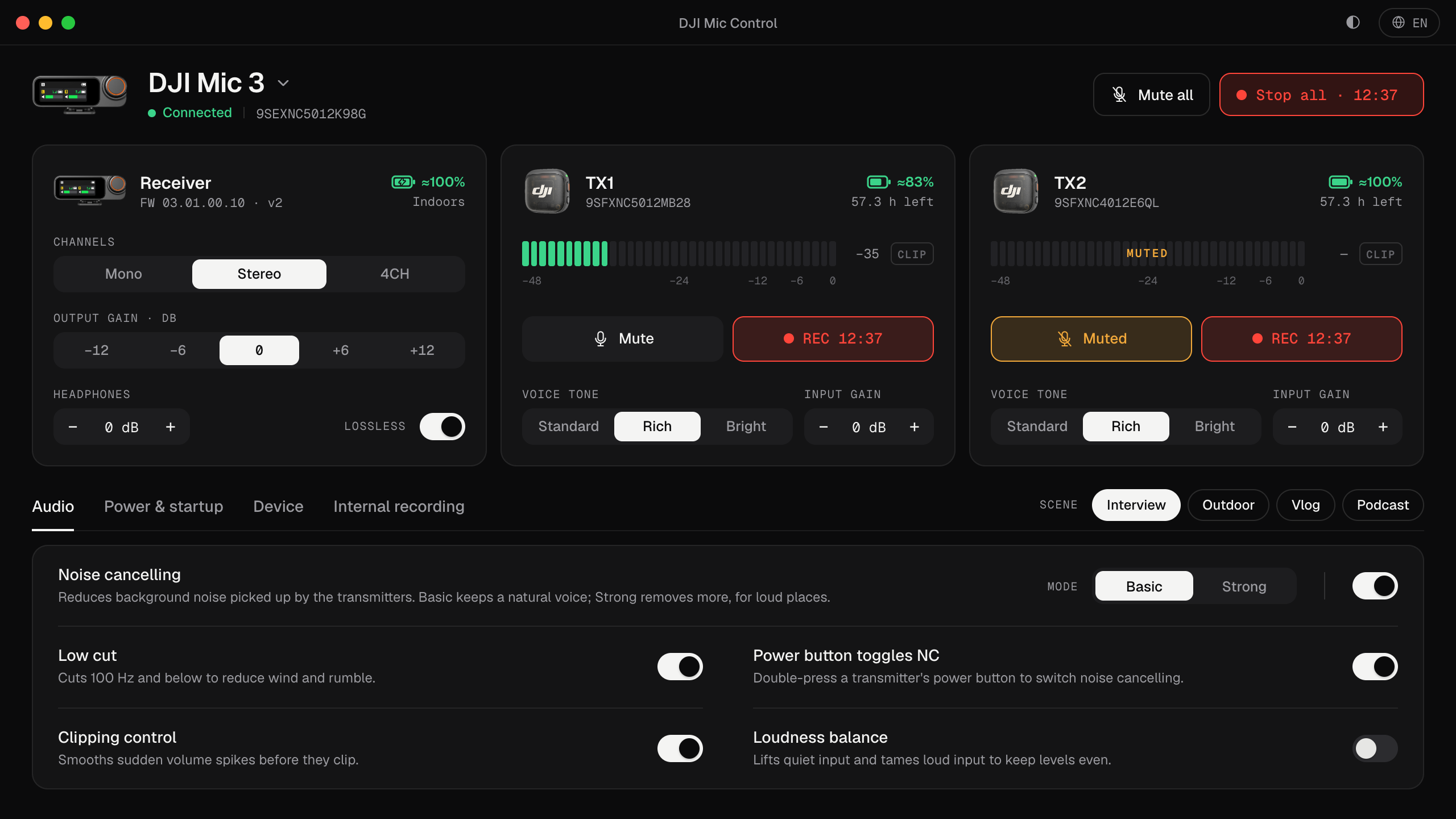
| Mic Control | macOS, Windows and Linux | DJI Mic 3 (tested) and the Mic Mini family | Live levels and every setting on the computer, open source |
DJI Mimo on your phone
The official app, and the only route DJI documents for firmware updates. If the mic usually lives on a camera or a phone, Mimo is the natural choice. If it lives on your desk, plugged into the computer, reaching for the phone every time you change a setting gets old quickly.
DJI Mimo on a Mac
On Macs with Apple Silicon, the Mac App Store offers the iPad version of DJI Mimo, marked as designed for iPad and not verified for macOS. That means Apple hasn’t checked that it works on a Mac and DJI doesn’t support it there. We haven’t tested whether it can control a DJI Mic this way, and we haven’t found reports that it does.
Android emulators
Searches for “DJI Mimo for PC” mostly lead to Android emulators such as BlueStacks. DJI doesn’t support Mimo in an emulator, and whether an emulator can even reach a USB or Bluetooth device depends on the emulator. We haven’t tested it. If you try it, be careful where you download emulators and apps from.
dji-mic-mo, in the browser
dji-mic-mo is an independent open-source project that controls DJI mics from a Chromium-based browser such as Chrome or Edge, with nothing to install. It focuses on the Mic Mini family; its page lists the models it currently supports. If you have a Mic Mini and use Chrome, it’s worth a look. Mic Control’s own Mic Mini 2S and Mobile Receiver support was cross-checked against its work.
Mic Control
Mic Control is the desktop app this site is about. It’s free, open source (public domain) and needs no account:
- Mac (Apple Silicon): signed and notarized by Apple, tested with a DJI Mic 3. See the Mac guide.
- Windows and Linux: previews built from the same code, not yet tested with a receiver. See the Windows and Linux guides.
- Mics: full control of the DJI Mic 3; fewer settings on the Mic Mini family.
- What it does: live levels for each transmitter with a clip warning, gain, noise cancelling, channel mode, scenes, internal recording, mute or record everything at once, battery.
- What it doesn’t: firmware updates, formatting the transmitters’ storage and timecode. For those, use DJI Mimo.
It has no network code at all: no telemetry, no auto-updater.
Which one should you use?
- The mic lives on a camera or phone: DJI Mimo.
- A DJI Mic 3 on your desk, plugged into a Mac, Windows or Linux computer: Mic Control.
- A Mic Mini, Chrome, and nothing to install: dji-mic-mo, or Mic Control if you prefer a desktop app.
- A firmware update: DJI Mimo, whatever else you use.
You can use more than one: the settings live on the mic itself, so what you change in one app shows up in the other. More on DJI Mimo and what stays there in the DJI Mimo alternative.
To try Mic Control
- 01
Download it
For Mac (signed and notarized), Windows or Linux (previews). Free, no account.
- 02
Plug the receiver in over USB-C
Mic Control finds it and shows only the settings your model has.
- 03
Adjust on screen
Levels, gain, noise cancelling, scenes and recording, without reaching for your phone.
What you'll be able to do
- See every transmitter's level live, with a clip warning.
- Change any audio or recording setting from the computer.
- Keep using DJI Mimo for firmware updates.
FAQ
Is there an official DJI Mic app for Windows?
No. DJI Mimo, the app for DJI's wireless mics, is for iOS and Android phones. DJI Studio, DJI's desktop app, is listed for other products such as the Osmo 360, not for the Mic.
Do I need software to use the mic on a computer?
Not to record: the receiver is a USB microphone. Software only matters to change settings or see levels from the computer. See how to connect it.
Can I run DJI Mimo in an Android emulator?
DJI doesn't support it, and whether an emulator can reach a USB or Bluetooth device depends on the emulator. We haven't tested it.
Can I use Mic Control and DJI Mimo together?
Yes. The settings live on the mic, so what you change in one app shows up in the other. Firmware updates still go through DJI Mimo.